
Affiliate Disclosure: This post contains affiliate links. If you click and make a purchase, SoftAIHub.com may earn a small commission at no extra cost to you. We only recommend software we have tested. Read our full Affiliate Disclosure here.
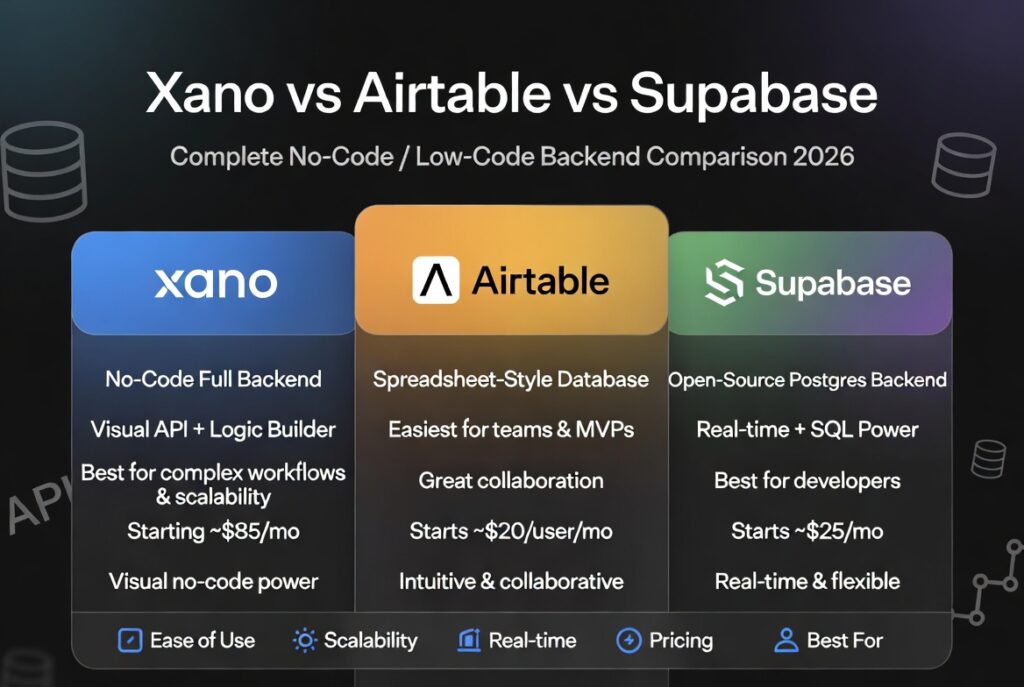
In this Xano vs Airtable vs Supabase comparison, we break down which backend tool is actually worth your time in 2026.
You start with a great idea—a SaaS product, a niche site, or a client app—but then face the million-dollar question: Where will your data live, and how will your logic scale?
While all three tools promise to simplify backend development, they serve completely different creators:
Airtable gives you spreadsheet simplicity for fast MVPs.
Xano delivers visual, no-code backend logic at scale.
Supabase offers open-source Postgres power for developers.
So, which one fits your exact project? Let’s dive in.
Xano vs Airtable vs Supabase Quick Verdict
Best For:
- Xano → No-code scalable backend
- Airtable → Simple database + content management
- Supabase → Developer-friendly backend
Starting Price:
- Xano → Free plan available
- Airtable → Free plan available
- Supabase → Free tier available
Free Trial: Yes (all three)
Ease of Use:
- Xano → Moderate
- Airtable → Easy
- Supabase → Advanced
Top Benefit:
- Xano → Backend without coding
- Airtable → Spreadsheet simplicity
- Supabase → Open-source flexibility
Our Rating:
- Xano → 4.5/5
- Airtable → 4.2/5
- Supabase → 4.6/5
What is Xano vs Airtable vs Supabase?
In this Xano vs Airtable vs Supabase comparison, we’re looking at three tools that solve the same problem—backend management—but in completely different ways.
Xano
A no-code backend platform that lets you build APIs, manage databases, and create app logic visually.
Airtable
A spreadsheet-style database tool that combines simplicity with light automation.
Supabase
An open-source backend platform built for developers, offering databases, authentication, and APIs.
Real Example
Let’s say you want to build a blog platform:
- Airtable: Store blog posts like a spreadsheet
- Xano: Build full backend logic (users, APIs, workflows)
- Supabase: Code-based backend with full control
Why People Search for This Comparison
- Confused between no-code vs developer tools
- Want to build apps without hiring developers
- Looking for scalable backend solutions
- Comparing pricing and features
Who Needs This Comparison?
- Bloggers building tools
- SaaS founders
- Affiliate marketers
- Agencies
- Beginners exploring no-code
Each tool serves a different type of user. Let’s break it down deeper.
Key Features in Xano vs Airtable vs Supabase
1. Ease of Use
Xano: Visual backend builder, but has a learning curve
Airtable: Extremely easy, like using Excel
Supabase: Requires coding knowledge
Best Choice: Airtable for beginners
Impact: Faster setup = quicker content or product launch
2. Database Capabilities
Xano: Powerful relational database
Airtable: Limited for complex relationships
Supabase: Advanced PostgreSQL database
Best Choice: Supabase for developers, Xano for no-code users
Impact: Better data structure = better scalability
3. API Creation
Xano: Built-in no-code API builder
Airtable: Limited API access
Supabase: Full API control via code
Best Choice: Xano for non-coders
Impact: APIs allow dynamic websites and apps → better UX
4. Scalability
Xano: Designed for scaling apps
Airtable: Not ideal for large-scale apps
Supabase: Highly scalable
Best Choice: Supabase or Xano
Impact: Scalability directly affects growth potential
5. Automation & Workflows
Xano: Advanced backend workflows
Airtable: Basic automations
Supabase: Requires custom coding
Best Choice: Xano
Impact: Automation saves time and increases productivity
6. Integrations
Xano: Works with Zapier, Make, frontend tools
Airtable: Huge integration ecosystem
Supabase: Developer-based integrations
Best Choice: Airtable for integrations
Impact: Integrations improve marketing and SEO workflows
Pricing & Plans Breakdown
Xano
- Free plan available
- Paid plans scale with usage
- Cost increases with API calls
Best For: Serious projects
Airtable
- Free plan with limits
- Paid plans based on records and features
Best For: Small projects and content management
Supabase
- Free tier available
- Pay-as-you-scale pricing
Best For: Developers building scalable apps
Hidden Costs
- Xano → API usage limits
- Airtable → Record limits
- Supabase → Infrastructure scaling
Value Comparison
- Cheapest: Airtable
- Balanced: Xano
- Powerful but variable cost: Supabase
Pros and Cons of Xano vs Airtable vs Supabase
Xano Pros
- No-code backend
- Scalable
- Strong API builder
- Great for SaaS
- Automation workflows
Xano Cons
- Learning curve
- Pricing grows with usage
Airtable Pros
- Extremely easy to use
- Clean interface
- Great for content management
- Strong integrations
- Fast setup
Airtable Cons
- Limited scalability
- Weak backend logic
- Not ideal for apps
Supabase Pros
- Developer flexibility
- Open-source
- Powerful database
- High scalability
- Full control
Supabase Cons
- Requires coding
- Not beginner-friendly
- Setup complexity
Xano vs Airtable vs Supabase: Detailed Comparison
Writing & Workflow Speed
- Airtable → Fastest setup
- Xano → Moderate
- Supabase → Slowest (coding required)
SEO Optimization Impact
- Xano → Best for dynamic content sites
- Airtable → Good for simple sites
- Supabase → Best for custom SEO setups
Pricing Comparison
- Airtable → Affordable
- Xano → Mid-range
- Supabase → Variable
Best Overall Choice
- Beginners → Airtable
- No-code builders → Xano
- Developers → Supabase
Real Use Cases
Bloggers
- Airtable → Content database
- Xano → Dynamic blog systems
- Supabase → Custom blog platforms
Affiliate Marketers
- Xano → Build comparison tools
- Airtable → Store product data
- Supabase → Advanced tracking systems
Agencies
- Xano → Deliver apps faster
- Airtable → Manage client data
- Supabase → Build custom solutions
Beginners
- Best choice: Airtable
SaaS & Niche Builders
- Best choice: Xano or Supabase
Xano vs Airtable vs Supabase : Final Verdict
So, which tool should you choose?
In this Xano vs Airtable vs Supabase comparison, the answer depends entirely on your goals.
- If you want simplicity → Airtable
- If you want no-code power → Xano
- If you want full control → Supabase
Who Should Choose What?
- Choose Airtable if you’re a beginner or content creator
- Choose Xano if you want to build scalable apps without coding
- Choose Supabase if you’re comfortable with development
Who Should Avoid Them?
- Avoid Airtable for complex apps
- Avoid Xano if you want zero learning curve
- Avoid Supabase if you don’t know coding
Final Thought
There is no single “best” tool.
But there is a best tool for you.
And now—you know exactly which one that is.
Wanna Master Your Backend with Xano?
Check out our expert guides to build scalable apps without code:
⭐ [The Deep Dive]: Xano Review 2026: Best No-Code Backend?
🚀 [The Integration]: Connect Xano with FlutterFlow: 2026 Guide
🏗️ [The Solution]: Build Scalable Apps with Xano Backend
🤖 [The AI Powerhouse]: Master AI App Development with Xano Backend: 2026 Tutorial
More from SoftAIHub:
🚀 Development: Best No-Code Development Tools for 2026
🎨 Creativity: Top 10 AI Tools for Content Creation
🎓 Productivity: Best AI Tools for Students in 2026
🛠️ Optimization: CCleaner Download Guide 2026: The Secret Weapon for Speed